How to Choose the Right HRIS for a Company Under 100 Employees
Let's be real: picking an HRIS for your growing company shouldn't feel like you're shopping for enterprise software that NASA would use. If you're running a business with under 100 employees, you're in a unique sweet spot, big enough that spreadsheets are a nightmare, but small enough that you don't need (or want to pay for) every bell and whistle that Fortune 500 companies demand.
The problem? Most HRIS buying guides are written for enterprises with dedicated IT teams and unlimited budgets. That's not your reality. You need something that works now, doesn't require a PhD to configure, and won't bankrupt you when you add your 50th employee.
Here's how to cut through the noise and find an HRIS that actually fits your business, not the business you might become in five years, but the one you're running today.
Why "Enterprise" Systems Are Probably Overkill
Workday, Oracle, SAP, these are household names in the HR tech world. They're also massive, complex platforms designed for companies with thousands of employees, multiple international offices, and HR teams that need their own HR teams.
For a company under 100 employees, implementing one of these systems is like buying a semi-truck when you need a pickup. Sure, it can haul your stuff, but it's expensive, hard to maneuver, and requires constant maintenance you probably can't afford.

Here's what "enterprise overkill" typically looks like:
Implementation timelines measured in months, not weeks. Some enterprise HRIS implementations can take 6-12 months. Your company can't wait that long for basic functionality like tracking PTO or running payroll.
Consultants required for basic changes. Need to add a custom field? Update a workflow? With enterprise systems, you're often calling a consultant at $200+ per hour. Small businesses need agility, not dependency.
Feature bloat you'll never use. You're paying for succession planning modules, advanced workforce analytics, and global mobility management when you just need solid time tracking and benefits enrollment.
The sweet spot for companies under 100 is usually in the mid-market HRIS category: platforms like BambooHR, Rippling, Gusto, or Namely. They're sophisticated enough to handle complex requirements but designed with smaller teams in mind.
Ease of Use Actually Matters (A Lot)
Here's a truth bomb: the best HRIS in the world is worthless if your team won't use it.
Your HR person (or the operations manager wearing an HR hat) doesn't have time to become a software expert. Your employees need to submit time-off requests without a manual. Your managers should be able to approve timesheets without three training sessions.
When you're evaluating systems, ask yourself:
Implementation speed is crucial. You're not just paying for software: you're paying for the time your team spends learning, configuring, and troubleshooting. A system that takes two weeks to implement saves you money compared to one that takes two months, even if the monthly subscription costs more.
Integration: The Make-or-Break Feature
Your HRIS doesn't exist in a vacuum. It needs to play nice with your accounting software, payroll provider, benefits administrator, and probably a handful of other tools you already use.
This is where a lot of small businesses get burned. They pick an HRIS that looks great in the demo, then discover it doesn't integrate with their existing payroll system. Now they're manually entering data in two places, which defeats the entire purpose of automation.
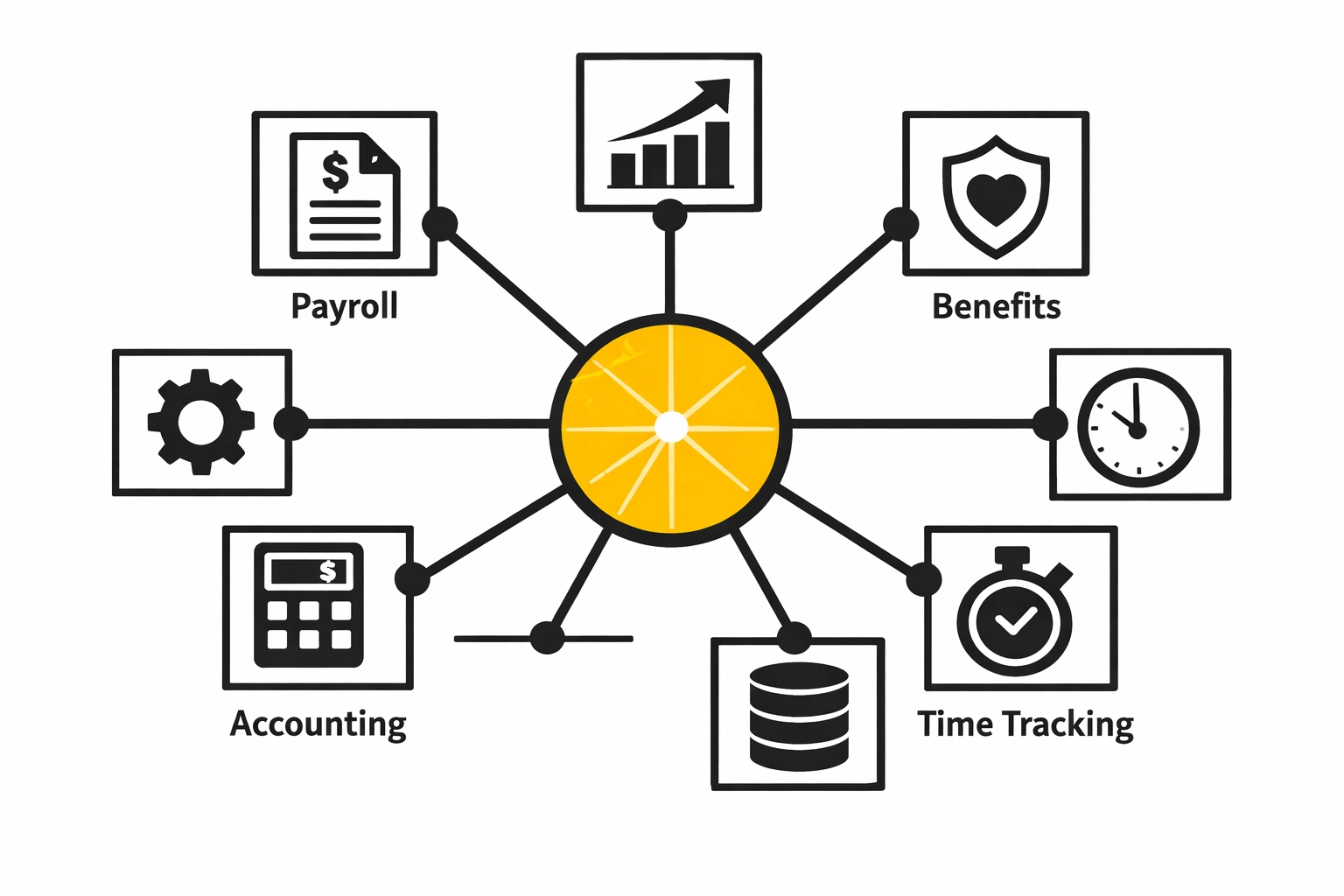
Must-have integrations for most small businesses:
Payroll software (or built-in payroll that actually works)
Benefits administration for health insurance, 401(k), etc.
Time tracking and scheduling if you have hourly employees
Accounting software like QuickBooks or Xero
Applicant tracking if you're hiring regularly
The goal is a connected ecosystem where data flows seamlessly. When an employee updates their address in the HRIS, it should automatically update in payroll. When someone enrolls in benefits, that information should sync with your benefits provider without manual intervention.
Here's the key question to ask vendors: "How does your system handle data sync with [specific tool you use]?" If they start talking about CSV exports or manual uploads, that's a red flag. Modern integrations should be real-time or near-real-time, and require minimal manual oversight.
Scalability: Growing From 20 to 100 Without Starting Over
Right now you might have 35 employees. Next year it could be 60. In three years, you might hit 100 or beyond. Your HRIS needs to scale with you: not just in pricing, but in functionality.
The nightmare scenario: You implement a system that's perfect for 30 employees, then discover at 75 employees that it can't handle multiple departments, complex approval workflows, or the compliance requirements that come with growth. Now you're shopping for HRIS platforms again, migrating data, and retraining your team.
Questions to ask about scalability:
The best approach is choosing a system that's slightly more robust than you need today. You want to grow into it, not out of it.
Cost Transparency: The Hidden Fees Problem
Here's where small businesses get especially frustrated: the advertised price is rarely the actual price.
You see "$8 per employee per month" and think, "Great, that's $320/month for my 40-person team." Then you start implementing and discover:
The payroll integration costs extra
The benefits administration module costs extra
You need the "Professional" tier for multi-state compliance
Implementation fees weren't included
Training costs extra
Premium support costs extra
Suddenly your $320/month system is actually $800/month: and you've already invested time in the implementation process.
Demand cost transparency upfront:
Get an all-in quote that includes modules you need, not just the base system
Ask about implementation costs including setup, data migration, and training
Understand what triggers price increases beyond just adding employees
Clarify what's included in support and what costs extra
Ask about annual price increases (some vendors have aggressive escalation clauses)
A vendor who's upfront about pricing, even if it's higher, is often better than one with a low entry price and nickel-and-dime fees.
How JHHR Helps You Find the Right Fit
This is where we come in. JHHR doesn't sell HRIS platforms: we help you find the right one for your specific situation.
We've implemented dozens of HRIS systems for companies under 100 employees. We know which platforms work best for construction companies versus tech startups. We know which systems handle California compliance well (spoiler: not all of them). We know which vendors have great sales teams but terrible support.
Our process:
We assess your actual needs, not what vendors think you need
We match you with 2-3 realistic options based on your budget, industry, and growth plans
We help you navigate demos and negotiations so you ask the right questions
We manage implementation so you actually get value from the system quickly
We stick around for optimization to make sure you're using what you paid for
The right HRIS isn't about having the most features: it's about having the right features configured correctly for your business. That's what we specialize in.
Making the Decision
Choosing an HRIS for a company under 100 employees doesn't have to be complicated. Start with your core needs, prioritize ease of use and integration, ensure the system can scale with you, and demand pricing transparency. Avoid the temptation of enterprise systems you don't need, and don't settle for "good enough" when the right system is out there.
If you're stuck in the research phase or overwhelmed by options, reach out to JHHR. We'll help you cut through the vendor noise and find an HRIS that actually works for your business: today and as you grow.
Because at the end of the day, your HRIS should make your life easier, not become another thing you have to manage.
Comments